Identify Any Brick Set
by Photo
Point the camera at the box and BrickBrain names the set — number, theme, piece count, designer, release year and whether it has retired. It will also work from the built model, from the instruction manual, or from a single minifigure sitting on the desk.
Not every set still has its box
Most identifier apps assume you are holding the packaging. Half a collection is loose on a shelf, and the interesting half is often a single figure in a drawer. BrickBrain asks what you are pointing at, and checks the photo actually shows it.
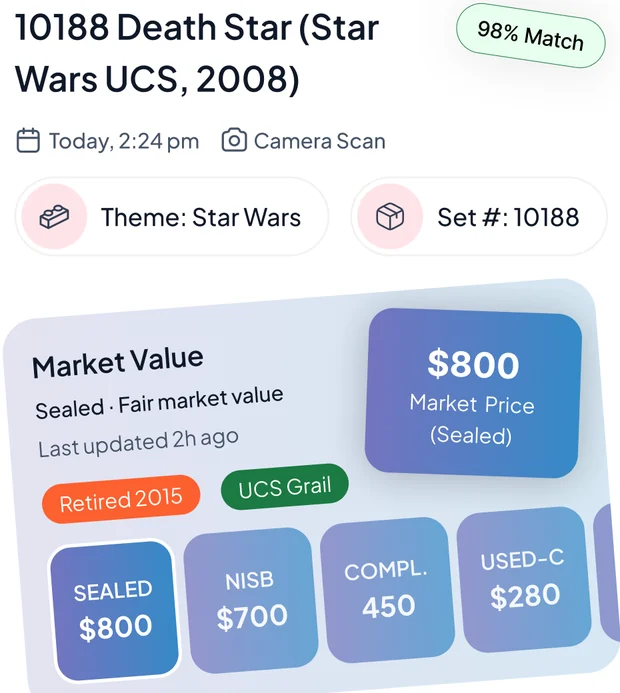
Priced across every completeness tier
- Sealed
- NISB
- Complete
- Used-Complete
- Incomplete
Three steps, one set at a time
No hunting a four-digit number on a battered box corner, then typing it into three different tabs.
Say what you are holding
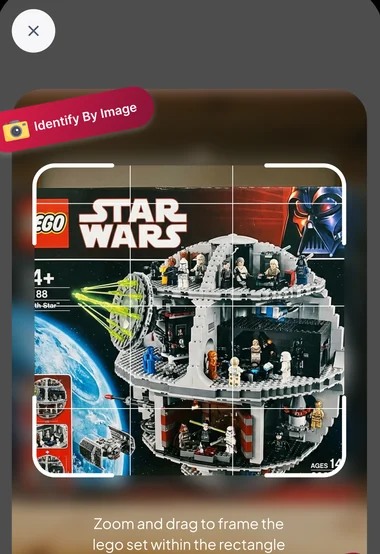
Box, built model, minifigure or manual. Zoom and drag to frame it, or point the camera straight at the four-digit set number printed on the box corner.
Read the set
Set number, theme, piece count, minifigure count, designer, dimensions, RRP, release year and retirement status — with a match confidence beside them.
Put it on a display
Save it to a display you named yourself, with its tier value and market trend alongside — and a running total for the whole collection.
More than an identifier — a collector's desk
Scanning is the front door. What keeps builders in the app is everything that happens to the set afterwards.
Scan without a daily quota
No per-day allowance to ration across a loft full of boxes. There is a fair-use ceiling to keep the service up, but ordinary collecting never reaches it.
A minifigure is identified as itself
Point at one figure and it comes back named as the figure — not as whatever set happens to contain it — with the set it originally shipped in noted separately, and left blank rather than guessed when that is not certain.
Five tiers, not one price
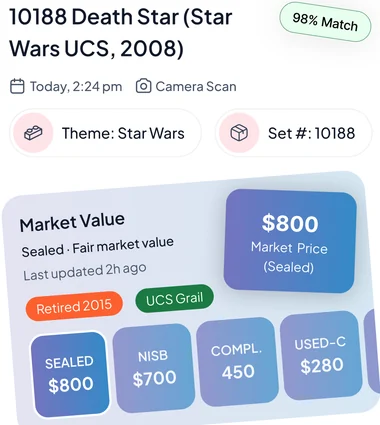
Sealed, NISB, complete, used-complete and incomplete — shown together, because the gap between them is the decision.
Displays & collection value
Sort sets and minifigures onto displays you name yourself, and watch the total move as values change.
Ask BrickBrain
Number rubbed off, or nothing left but the bricks? Answer five questions — theme, set type, retirement status, era and completeness — and the catalogue narrows itself down.
Photo enhancer
Clean up a dim or glare-heavy shot before it goes to the identifier — better input, better match.
Browse & search
Look a set up by name or number, or filter the catalogue by theme, and open the same detail page a scan gives you.
Scan history
Everything you have identified stays in recent scans — re-open a set without photographing it twice.
It checks the photo shows what you said it does
Pick "minifigure" and photograph a box and it will tell you so rather than answering the wrong question. On the set-number mode it reads only the printed digits, and refuses to infer a number from how the model looks.
The date a set stops being made
Nothing moves this market like retirement. A set that was on a shelf at RRP last year can be the one everybody wants the year after, and the only thing that changed is that you can no longer buy it new. BrickBrain puts that on the page.
-
Release and retirement dates Both shown, so the gap between them is visible at a glance.
-
Original RRP alongside the market price What it cost new, next to what it costs now.
-
Piece and minifigure counts Plus the designer and the built dimensions, where the catalogue has them.
-
Market trend and last recorded sale Movement rather than a single frozen number.
It asks what it is looking at first
A photo of a box and a photo of one minifigure are different questions, and answering the wrong one wastes your time. So the subject you pick is carried through to the model, which validates the image against it before it answers at all.
-
The subject changes the question Each mode gets its own instructions rather than one generic prompt.
-
Set numbers are read, never inferred In set-number mode only the printed digits count.
-
Minifigures keep their own names The figure is the answer; its origin set is a separate field.
-
Strict when it is unsure If the photo does not match the subject, it returns nothing rather than a guess.
Straight from inside the app
Real screens: frame the set, then read what came back.
Taken from the BrickBrain App Store screenshots. Set names and figures shown are examples — what the app reports depends on the set and its condition.
What you get with BrickBrain
BrickBrain is a subscription app: the download is free, and full access comes with the subscription. Where your store offers an introductory free trial, the purchase screen shows it before you commit.
Start with the appPrice, any introductory offer and renewal terms are set by the App Store or Google Play and are shown on the purchase screen in your region before you buy. If a trial is offered it converts to a paid subscription unless you cancel beforehand, and you can cancel any time from your store subscription settings.
-
Set scans without a daily quota By box, built model, minifigure or manual.
-
Every completeness tier Sealed through incomplete, side by side.
-
Release, RRP and retirement With piece and minifigure counts and the designer.
-
Display tracker Displays and a running total for the whole collection.
-
Ask BrickBrain Five questions when a photo will not do it.
Questions, answered
The things collectors ask us before they download.
Find out what is in the loft
Free to download. Open the first box you find, photograph whatever is inside it, and see whether it retired.